When a Landing Page Looks Fine but Doesn’t Convert
Most landing pages don’t fail because they’re broken. They load, they look polished, and they say the right things — at least on the surface. Yet conversions stay low, bounce rates stay high, and it’s never obvious why. Founders tweak headlines, marketers test colors, developers optimize performance, but the results often feel disconnected from the effort. The problem isn’t a lack of tools or opinions — it’s a lack of clear diagnosis.
What makes this harder is that understanding why a landing page isn’t converting usually requires expertise across multiple areas: copy, performance, SEO, accessibility, and user trust. For many teams, that means guessing, hiring specialists, or running changes blindly and hoping something sticks. The gap between “this page exists” and “this page works” is still surprisingly wide — and that’s the gap tools like FixMyLanding are trying to close.
What This Tool Actually Does
At its core, FixMyLanding acts as a diagnostic layer between “this page exists” and “this page converts.” Instead of asking you to guess what’s wrong, it analyzes a landing page from multiple practical angles and highlights the areas most likely holding performance back. You start by entering a publicly accessible URL, and the tool scans the page to evaluate elements that commonly affect conversions, including copy clarity, page structure, performance, SEO fundamentals, accessibility, and basic security signals.
What makes the output useful is not just the scoring, but the prioritization and explanation. Rather than stopping at abstract grades or percentages, the tool points out specific issues — for example, unclear value propositions, missing trust elements, slow-loading assets, or accessibility gaps — and explains why they matter. In many cases, it also suggests concrete ways to improve them, ranging from copy adjustments to technical fixes. The goal isn’t to redesign your landing page for you, but to give you a clearer understanding of what to fix first, before making changes blindly.
This makes the tool especially practical for early-stage founders, marketers, and developers who don’t always have access to conversion specialists or full audits. It doesn’t replace expert review, but it shortens the distance between uncertainty and informed action — helping teams focus their time and effort where it’s most likely to make a difference.
How to Perform a Landing Page Audit Using FixMyLanding
Running an audit on FixMyLanding is intentionally simple, even if you’re not technical. Once you’re logged in, the first thing you see is a single input asking for a URL. You paste the link to your landing page, click Start audit, and the analysis begins. There are no settings to configure and no questions to answer — the tool assumes a real-world use case and gets to work immediately.

The audit typically takes around 3–5 minutes, depending on the complexity of the page. During this time, FixMyLanding scans the page across multiple dimensions, including SEO fundamentals, conversion clarity, security checks, and domain signals. Once the scan is complete, you’re taken to a summary view that shows an overall score along with individual scores for SEO, Conversion, Security, and Domain. This gives you an instant, high-level sense of where the page stands and which areas need the most attention.

Below the score summary, the audit starts to get more specific. You’ll see a Domain Rating section that explains how your domain name contributes to trust and credibility. This section is visible to all users, but the detailed insights are unlocked with a Pro plan — which makes sense, given that domain strategy tends to matter more for long-term products than quick experiments.

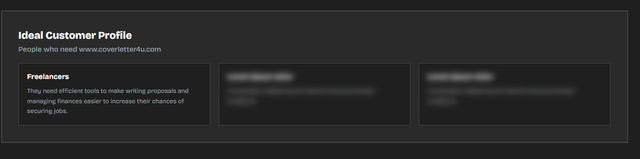
As you scroll further, the audit shifts from diagnosis to direction. FixMyLanding identifies ideal customer profiles for the page based on its content and positioning, followed by recommended subreddits where the product could realistically be shared or discussed. This part is especially useful for founders and indie developers who are trying to figure out where to promote, not just what to fix.

The audit then moves into concrete improvement suggestions. You’ll see copy changes designed to improve clarity and conversion intent — such as headline rewrites, CTA refinements, and feature description adjustments. Each suggestion is tied to a specific section of the page and explains why the change could help, rather than just presenting a rewritten sentence.

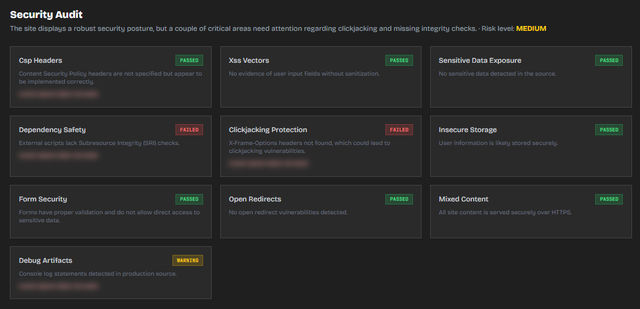
For Pro users, the audit goes even deeper. Additional sections include top keyword analysis, a detailed security audit highlighting issues like missing headers or risky scripts, and a consolidated list of total issues found across the page. These sections are especially useful for teams that want to move beyond surface-level feedback and understand structural risks or technical gaps.


Finally, FixMyLanding generates an AI Fix Prompt — a structured, ready-to-use prompt that you can paste into tools like Claude, Cursor, or other AI coding assistants. The prompt lists every issue found and includes suggested fixes, allowing the AI to handle copy changes, SEO improvements, security updates, and structural adjustments in one go.

In terms of limits, FixMyLanding allows one full audit per month for free. Upgrading to the $9 Pro plan increases this to 15 audits per month and unlocks all sections without hidden restrictions. The team has also shared plans to introduce additional scan insights, pricing-tier analysis, and a one-time unlock option in the future.
Our Honest Take: When FixMyLanding Is the Right Tool
Helpful for Diagnosing Issues — and Actually Fixing Them
FixMyLanding is genuinely useful when the problem isn’t making a landing page, but understanding why it’s not working. The audit does take a bit of time — usually around 3–5 minutes — but that time feels well spent. Instead of surface-level scores, it surfaces the kinds of issues you’d expect from a thoughtful audit: clarity gaps, conversion blockers, SEO misses, and security concerns.
What stood out to us is that even the free plan delivers meaningful value. We ran audits on a free account and still walked away with insights that were actionable and practical, not filler. It feels like a tool built out of a real need for feedback — not one designed to gate everything behind an upgrade.
Transparent Pricing, With Room to Improve
Pricing-wise, FixMyLanding keeps things refreshingly simple. The $9/month Pro plan unlocks full audits and allows up to 15 website scans per month, with no hidden restrictions. That level of transparency is a plus — you know exactly what you’re paying for.
That said, we do feel there’s room for improvement. Fifteen audits per month is more than most solo founders or small teams realistically need. A lower-priced tier — for example, $5 for 5–10 audits — could make the tool more accessible without reducing its value. Still, even with this limitation, the pricing remains fair and honest.
Who Should Use This
FixMyLanding is best suited for people who already have a landing page live and want clarity before making changes. If you’re unsure what to fix or where to start, this tool fits naturally into your workflow.
This tool is a good fit if you are:
- Founders or indie hackers trying to understand why a landing page isn’t converting before redesigning it
- Marketers who want a second opinion on copy, structure, and conversion elements
- Developers who need a quick but structured audit before optimizing performance or SEO
- Freelancers or agencies reviewing client landing pages and looking for clear, defensible recommendations
- Non-technical users using AI builders who can create pages easily but struggle to evaluate quality and effectiveness
On the other hand, this tool may not be ideal if you’re looking for:
- automatic fixes applied directly to your site
- deep, custom CRO consulting
- advanced enterprise analytics or A/B testing platforms
FixMyLanding works best as a diagnostic and decision-making tool — something you use before investing time, money, or effort into changes. It helps answer a simple but important question: what’s actually worth fixing right now?


