Sharing your progress online used to take too much time. You track your followers, likes, or other numbers, but then spend minutes making a screenshot or hours editing it to look good. Sometimes you need design skills or paid tools to make it stand out. As a result, many achievements go unnoticed, and your story does not receive the attention it deserves. People scroll past plain text or basic images, and you miss out on the chance to inspire others or grow your community. It can feel frustrating when you have put in the work but cannot show it in a way that catches attention. This is a common problem for creators who want to build in public, where sharing updates helps connect with people and gather feedback.
Groar fixes this problem. It is a free tool at Groar that turns your raw stats into shareable graphics, posts, and images in minutes. You just enter your data and get ready-to-use visuals you can post, edit, and share right away. The change is simple. You stop using plain screenshots and start showing your growth in a way that excites people almost instantly. With Groar, your numbers come to life with colors, highlights, and styles that make them engaging to look at. It helps you celebrate small wins like gaining a few followers or reaching a milestone, turning them into something people want to like, comment on, and share. This not only boosts your motivation but also helps you attract more support from your audience.
Who Can Use Groar And What You Can Do
The best thing about Groar is that anyone can use it. You do not need tech skills or a big following. Content creators, builders, startup founders, social media users, and even hobbyists can make their stats look amazing quickly and for free. It is designed for people at all levels, from beginners starting their online journey to experienced users who want a faster way to share updates without wasting time.
Groar is perfect for everyday sharing. It works with follower counts, engagement numbers, milestones, or any growth data you want to showcase. It creates clean images, banners, and posts with trends, highlights, and styles. It is not just a basic editor. The platform helps you turn your numbers into clear visuals that are easy to understand and attractive to share. You can celebrate wins, motivate others, and build your brand without extra effort.
For example, if you are a developer building a new app, you can show how many users you gained this week in a colorful graphic that looks professional. If you are an influencer, you can turn your like counts into an engaging post that gets more interaction. Even if you are tracking personal goals like fitness progress or learning a skill, Groar makes your progress exciting to share with friends and followers.
This tool is especially useful for people who build in public, such as developers sharing product growth or creators tracking audience progress. It turns simple updates like “+50 followers this week” into visuals people want to like and share. For small teams, it saves time when sharing reports or updates. For individuals, it makes personal achievements feel more real and motivating.
Groar supports different types of growth data. Whether you are measuring website visits, email subscribers, video views, or follower counts, you can create visuals that match your needs. The tool also provides design options like arrows for growth trends or badges for milestones, helping your posts perform better on social platforms.
Four Steps to Create Your First Visual
From your stats to a shareable image, the whole process takes only minutes.
1. Sign Up or Log In
Create your free account at Groar. It takes just a few seconds. You can sign up quickly using Google. Once you do this, you get access to the main features and can start exploring right away. The process is secure and simple, with no long forms or complicated setup.
2. Enter Your Data or Fetch Available Stats
Most stats can be entered manually, such as followers, likes, engagement numbers, or other growth metrics you want to display. This gives you full control over what numbers appear in your visual.
For X accounts, Groar can automatically fetch followers, followings, and posts. If you are sharing SaaS metrics, some numbers can also be auto-fetched through the TrustMRR API when it matches the same X handle. Support for fetching more metrics automatically is also planned in future updates.
3. Generate the Visual
Once your stats are ready, choose the design style you prefer. Groar then generates multiple visual options using colors, layouts, and highlights that make your growth easy to understand and attractive to share.
4. Review, Edit, and Share
Check the live preview, adjust colors or text if needed, then download the final image as PNG or JPG and share it on your platforms. The preview helps you see how it will look on social media before posting. You go from simple numbers to a polished visual in minutes instead of hours. This quick process allows you to share updates while they are still fresh, keeping your audience engaged and interested in your progress.
Example: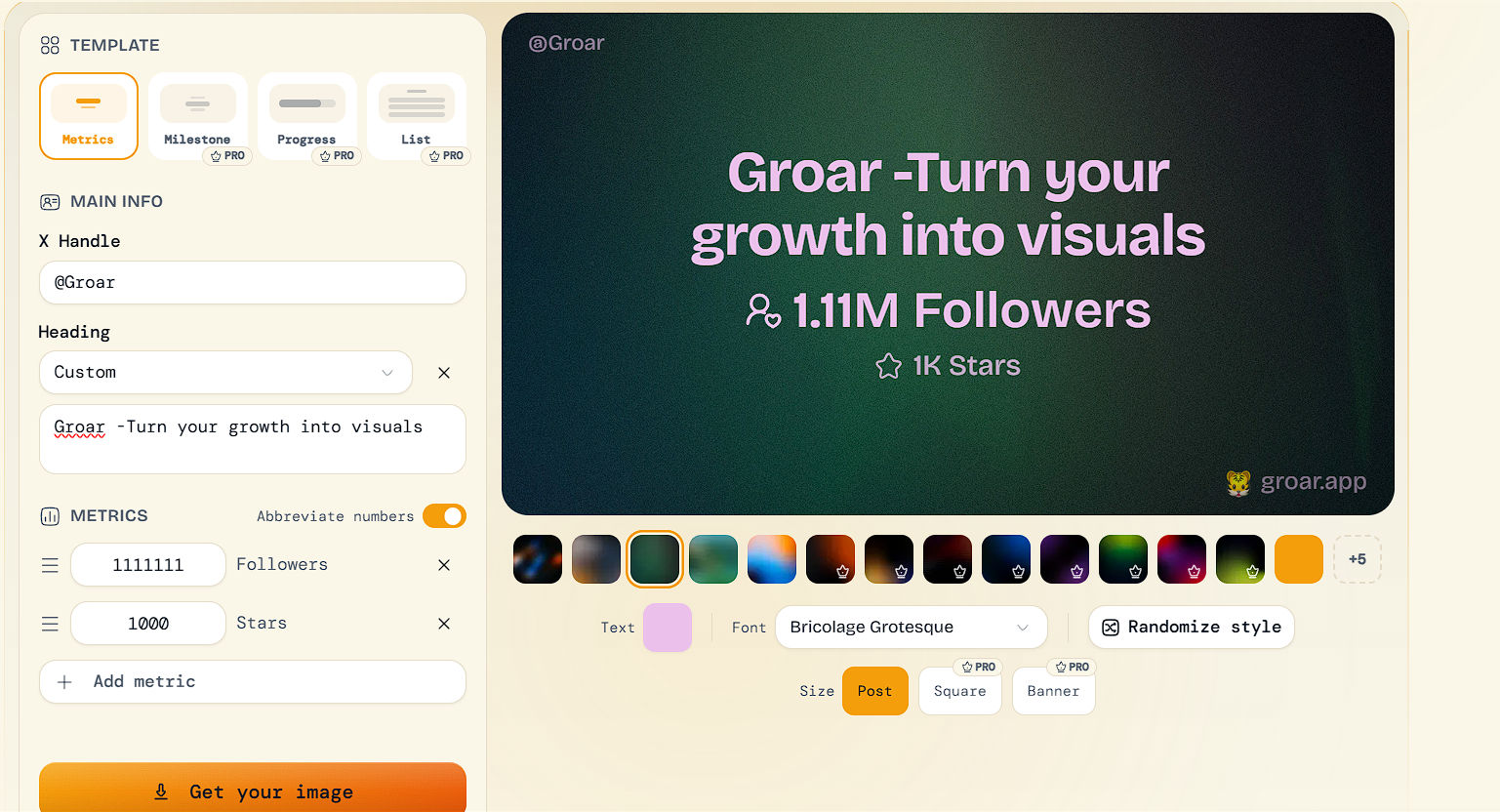
Plans & Free Access
Groar offers a free plan and a Pro upgrade depending on how often you create visuals.
Free Plan — for hobby growers
- Full access to the editor
- 3 exports per week
- 5 backgrounds included
- Metric template
- Groar watermark
This plan is perfect if you just want to share occasional growth updates.
GROAR Pro — for serious builders
$9 (one-time, originally $29)
- All templates unlocked
- Full background library
- Custom branding & no watermark
- Export history & re-import
- Unlimited exports
- Connect up to 3 accounts per platform
- Chrome extension (coming soon)
You can also start with a 3-day free trial, and no credit card is required.
What Other Builders Say
Don't take our word for it

Our Honest Take: When Groar Is the Right Tool
Groar is a simple and useful tool for creators who want to share their progress online without spending time on design work. It helps turn basic numbers like followers, milestones, or growth stats into clean and stylish visuals that are easy to share.
It works best for build-in-public creators, founders, and social media users who regularly post updates about their journey. Instead of using plain screenshots, Groar makes those updates look more polished and engaging.
While it is not meant for complex charts or advanced analytics, it does exactly what it promises: helping you present your growth in a better and more eye-catching way.
Start for free today at Groar. Just sign up, add your first stats, and see the results instantly. Try it once, and you will be surprised how quickly you can turn simple numbers into impressive visuals.


