Getting a new application running on localhost is easier than ever. You can build out complex features, connect your database, and have a working prototype in a matter of hours.
But the moment you try to push that app to production, the momentum hits a brick wall.
Suddenly, you are no longer building a product. You are fighting a losing battle against broken Dockerfiles, confusing cloud permissions, failing CI/CD pipelines, and cryptic YAML errors. It is incredibly frustrating when you end up spending more time figuring out how to deploy the application than you did writing the actual code.
When developers are forced to become part-time cloud architects, product momentum completely dies.
NEXUS AI was built to fix this massive bottleneck. It is an AI-native DevOps platform that allows you to deploy production-ready applications simply by using smart CLI commands, the API, or by describing what you want to your AI coding assistant. Instead of fighting with server configurations, you let the tool handle the heavy lifting.
Here is why NEXUS AI is gaining traction as a highly attractive alternative to traditional, headache-inducing deployment workflows.
Visual Safety Meets Terminal Speed
Most cloud providers force developers to click through hundreds of confusing dashboard settings to launch a simple app. NEXUS AI gives you a much better workflow by providing a visual safety net for your infrastructure while keeping you in your flow state:
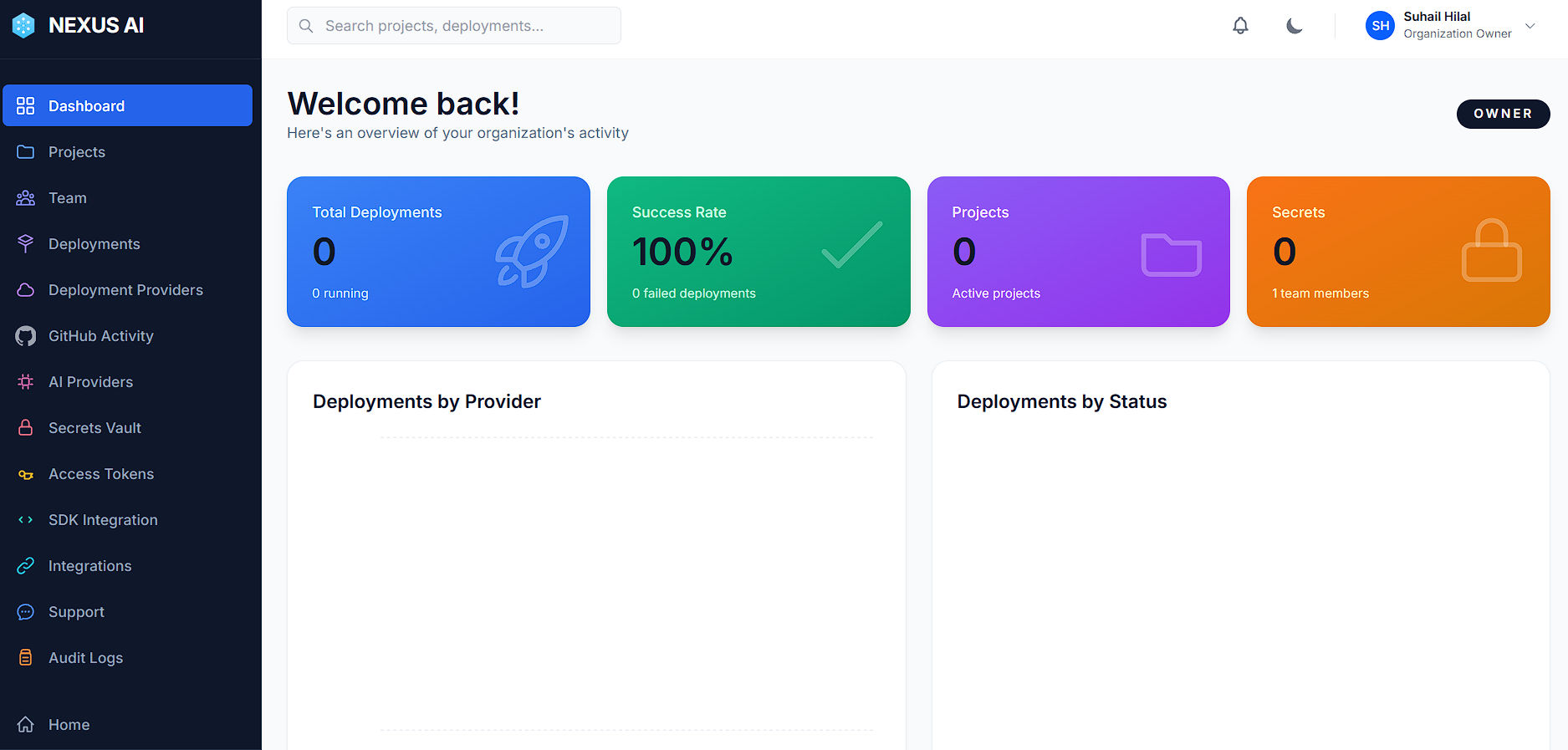
- The Web Dashboard (UI): Your visual command center for everything the CLI does behind the scenes. From here, you can track active Projects and Deployments, or set up your Deployment Providers (like GCP, AWS, Azure, or Local Docker). It also handles the heavy lifting for security and team workflows, giving you access to a secure Secrets Vault for environment variables, Access Tokens, and Team management, as well as full Audit Logs. You can even monitor real-time GitHub Activity, configure SDK Integrations, or swap AI Providers without touching a single config file.
- The Terminal CLI & API: The real engine for developers. You can deploy, configure, and troubleshoot apps right from your command line or integrate it directly via API, so you never have to leave your code editor.
- AI Prompts (MCP Integration): This is where the AI comes in. If you are building with AI assistants in your code editor, you can route NEXUS AI through the MCP connector to handle deployments entirely through natural conversation.
So, how easy is it to actually use?
How to Ship Your App in 4 Simple Steps
NEXUS AI makes getting your code live incredibly frictionless. You can go from a GitHub repo to a live URL in minutes.
1. Make Your Account & View the Dashboard
Sign up on nexusai.run. You can quickly sign up using Google or GitHub for instant access. You will immediately land in your visual Web Dashboard, which acts as your home base.
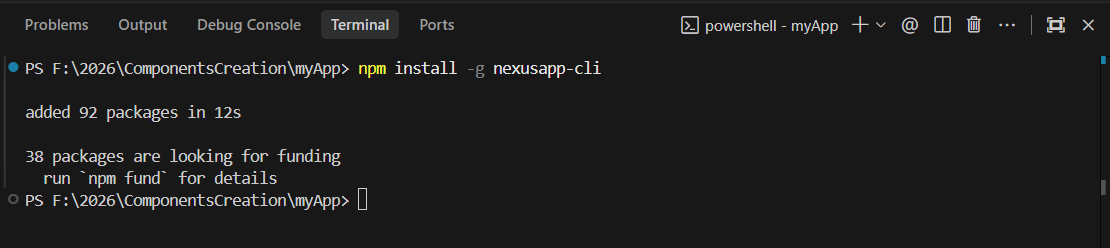
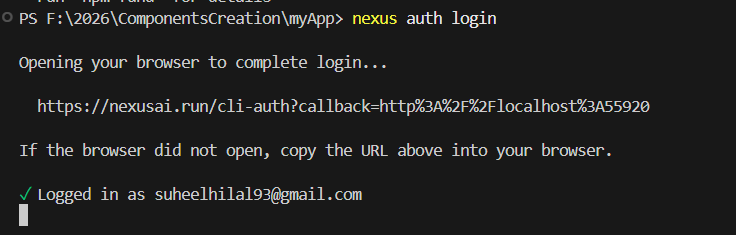
Once your account is active, open your local terminal, install the tool via npm install -g nexusapp-cli, and run nexus auth login to securely connect your machine.
Install Command:
Auth Command:
2. Deploy Your Code (Choose Your Workflow)
NEXUS AI doesn't force you into a single box. You have multiple options to deploy your app based on your preference:
- The Traditional CLI Way: If you are deploying straight from your standard terminal, use the strict CLI commands to pull directly from your repository. For example:
nexus deploy source \ --repo https://github.com/user/frontend.git \ --name my-site \ --provider gcp_cloud_run \ --wait
- The AI-Assistant Way (Cursor & VS Code): If you want to use plain English, you can connect the NEXUS AI MCP server directly to your AI code editor.
- If you use Cursor: Simply open your AI chat panel and tell it what to deploy.
- If you use VS Code (with GitHub Copilot): Press
Ctrl+Shift+P(orCmd+Shift+Pon Mac) and search for "MCP: Add Server" to plug in NEXUS AI. Then, open your Copilot Chat panel, change the dropdown at the bottom to Agent Mode, and use a precise AI prompt like:@nexus ai deploy app name myapp from https://github.com/user/app.git use secret gitrepo, On docker provider, use framework node, use env PORT=3000 API_URL=somehostCopilot will instantly execute the deployment for you, injecting your secret tokens and environment variables automatically.
3. Track Progress & Get AI Support
Once your deployment is queued, the CLI gives you a tracking ID. You can watch your infrastructure spin up live by running nexus deploy status <id> --watch.
Sometimes, deployments fail due to missing dependencies, unassigned ports, or environment mismatches. If your container exists and the deployment fails, NEXUS AI acts as your personal DevOps expert. You can instantly pull the error output by running nexus deploy logs <id>, and ask the built-in AI to analyze the build failures and provide an instant fix.
4. Monitor & Scale Instantly
Once your app is live, you can manage it however you prefer. You can open your Web Dashboard to visually track metrics, or you can scale directly through the terminal by running commands like nexus deploy scale <id> <replicas>.
Simple Plans & Pricing
NEXUS AI offers flexible, straightforward plans for everyone, from solo developers running early experiments to large enterprise teams needing strict compliance.
Starter Plan ($29 / month)
For individual developers and early experiments.
- Application Generation Engine
- Deploy directly to NEXUS AI
- Shared containerized runtime
- Limited concurrent deployments (2)
- Public HTTPS endpoint with custom NEXUS AI domain
- Community support
Pro Plan - Most Popular ($149 / month)
For startups and serious SaaS teams building out their products.
- Everything in Starter, plus:
- Multi-cloud deployments (AWS, GCP, Azure)
- 5 active deployments & up to 10 concurrent containers
- Versioned deployments with one-click rollback
- Real-time observability (logs + status)
- Secure configuration vault (environment variables & secrets)
- Team access (RBAC)
- Email support
Enterprise Plan (Custom Pricing)
For compliance, scale, and control in regulated industries.
- Everything in Pro, plus:
- Customer-owned cloud projects (deploy directly into your own AWS/GCP/Azure)
- Private build & runtime isolation
- Unlimited deployments & versions
- Advanced audit logs & SSO (SAML / OIDC)
- IP allowlisting & network controls
- Dedicated support, SLA, and compliance support (HIPAA / SOC-ready patterns)
Our Honest Take: Is NEXUS AI Worth It?
When looking at NEXUS AI, it is clear that it offers incredible value, but it helps to know exactly where it shines the brightest.
If you are just starting to learn DevOps or writing quick personal scripts for fun, setting up servers manually is a fantastic way to explore the ecosystem. But if you are building production software, managing backend systems, or launching apps that other people actually rely on, upgrading your workflow with NEXUS AI is a powerful investment.
Why? Because complex infrastructure is a silent killer for software projects. It is incredibly frustrating to spend weeks building a feature, only to realize your deployment pipeline is completely broken. By automating the heavy lifting, the tool can save you hours of debugging a server configuration—time better spent building your product.
It acts like a smart, senior DevOps engineer sitting over your shoulder—instantly providing automated diagnostics, parsing your logs, and suggesting direct fixes—to give you fast deployments that stop headaches before they happen and turn a risky setup into a strong, modern project you can trust.
If you want true peace of mind, start today on nexusai.run. Just sign up, connect your CLI or AI code editor, and see the difference right away. You will be amazed at how much easier coding becomes when you stop guessing and start letting AI handle the infrastructure.


